Originally published on X here
How Do LLMs Work With Excel Files?
· Danial A.

TLDR
- LLMs default to Python’s openpyxl library for Excel files
- Problem: openpyxl has no calculation engine - LLMs can change values but can’t see linked cells update
- Solution: prompt LLMs to use headless LibreOffice for full recalculation
How LLMs Actually Handle Excel Files
By default, LLMs reach for openpyxl. The workflow:
- Open workbook with openpyxl
- Print out values and formulas for each cell
- Reason from this output to understand the model
- Make changes using openpyxl
- Save and close
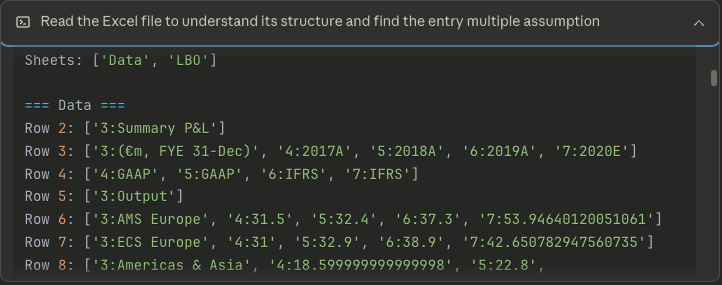
At no point does the LLM check if the output is correct after making changes. Because it can’t.
The Problem with openpyxl
openpyxl is a great library - credit to the maintainers - but it’s designed to read and write Excel files. It has no calculation engine.
Here’s a toy example: you ask an LLM to change an input cell and report the output.
The LLM will:
- Print cell values by loading just the data:
wb = openpyxl.load_workbook('model.xlsx') - Do the same with formulas:
wb = openpyxl.load_workbook('model.xlsx', data_only=False) - Reason through the data to understand how the spreadsheet flows
- Manually calculate what it believes the output should be - instead of just asking the spreadsheet
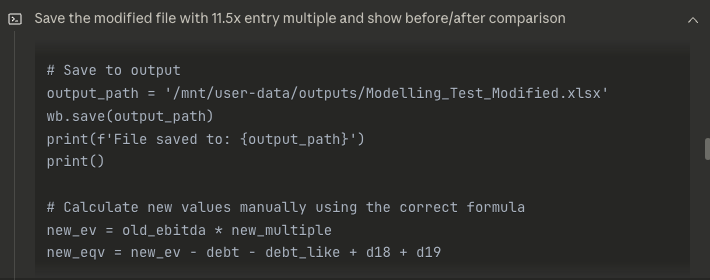
This seems fine until you realise:
- Context expensive - the LLM writes Python to calculate values instead of letting Excel’s engine do its thing
- Non-reactive - spreadsheets are reactive. Change one cell, everything linked updates. A Python script doesn’t replicate this
- Misses nuance - real Excel files have quirks: plugged values, special formatting, conditional logic, inconsistent data flow. An LLM misses all of this when calculating manually
Other libraries aren’t great either. formulas has a calculation engine but doesn’t support data tables - so you’d need to strip those out first. xlwings could work, but it requires the LLM to have access to Excel in their environment. They don’t.
The Fix: Headless LibreOffice
For most use cases, headless LibreOffice is the answer.
Quick explainer: LibreOffice is open-source Excel. Headless means no UI - you interact with it programmatically.
Prompt the LLM to use a headless LibreOffice instance when dealing with spreadsheets. Specifically, tell it to recalculate values after making changes. LLMs can be stubborn about this - they’ll want to just calculate things in Python.
This gives you:
- Full recalculation engine
- Data table support
- No GUI overhead
- Works on Linux servers (where LLMs live)
The new workflow:
- LLM loads the workbook using openpyxl twice (data only, then formulas) to understand structure
- Makes changes using openpyxl
- Triggers recalculation via headless LibreOffice
- Checks results with openpyxl, iterates
The tradeoff is speed and occasional compatibility quirks. The LLM triggers recalculation by converting xlsx to xlsx via LibreOffice (not a typo - converting forces a recalc).
For most financial models, it just works.
What’s Next: Computer Use
Screenshot-and-mouse interaction is going to be big in 2026. Today it’s slow and janky. But LLMs are getting scary good at generating synthetic UI for training - by year-end, we’ll probably have models that can drive Excel like a human.
Superhuman Excel modellers are coming. They’ll need a mix of computer use and programmatic access - openpyxl, LibreOffice, or something better.
Until then? Finance bros, our jobs are safe.